Your job is on Indeed, the candidate is interested and clicks. And that is where it starts: on to your site, wait for the page to load, fill in a form, hunt for a CV on a phone. Some of your candidates never make it to the end. You paid for the click anyway.
With Indeed Apply the candidate skips that route. They apply on Indeed itself, with the profile and the CV that are already waiting there, and that application goes straight into your organisation's ATS. Booston takes care of the part that makes this possible: we put your job on Indeed through the Jobboard network and send along the job number Indeed already holds for that job. The goal: more completed applications out of the same click budget, without the candidate needing your site at all.
This article explains what your ATS has to be able to do, what we set up, what you gain and what you give up, and where the results do and do not end up. You will find the screen under Menu → Campaigns → Jobboard network.
Before you start
- The Jobboard network module is active on your environment and your account is connected. Booston sets that up at the start.
- Your organisation's ATS has its own connection to Indeed and feeds jobs to it.
- You have jobs that are active and published, and they are running in a campaign on the network.
- Your user role has access to Jobboard network. Which role can do what is set in Users: giving access, choosing roles and signing in through your ATS.
What Indeed Apply is, and who does what
Indeed Apply is Indeed's own apply button. The candidate clicks it on the job, fills in the fields on Indeed and is done. Indeed then sends that application to the ATS the job came from. Indeed itself reports a median of a little over forty seconds for a completed application on mobile, and that is where the gain sits: the shorter the route, the fewer people drop out.
Worth being clear about: that button and that form belong to Indeed, not to Booston. We do not build them and we do not sit in between. What we do is make sure Indeed recognises your job in the campaign as the same job it already pulled from your ATS. Without that recognition Indeed leaves the button off and sends the candidate to your website after all.
| Who | What they do |
|---|---|
| Your ATS | Feeds the job to Indeed, with the ATS's own job number attached, and receives the application back. |
| Indeed | Puts the apply button on the job and handles the application. |
| Booston | Puts that same job on Indeed through the job board network and sends along the job number Indeed matches on. |
| You | Decide which jobs take part and on what budget, and steer on the cost per application. |
What Indeed calls it
Indeed uses three names interchangeably, which makes it hard to search for. For employers it is Indeed Apply, in Dutch it is Direct Solliciteren and in German Indeed Bewerben, and on the job itself the candidate sees a label such as Easily apply. It is all the same thing. If you run into "Easy Apply", you are looking at LinkedIn and not at Indeed.
Your ATS has to support it
This is the condition everything hangs on. The application that is completed on Indeed has to land somewhere, and that somewhere is your organisation's ATS. Indeed does that through its own ATS integrations, of which it now supports more than 350. If your ATS is not among them, or the integration exists but is not switched on for your environment, there is nothing for Booston to do.
So ask your ATS supplier these three things:
- Does the ATS feed our jobs to Indeed directly, and is that integration active for our environment?
- Do applications completed on Indeed genuinely arrive in the ATS, on the right job?
- Which job number do you send to Indeed, and where do we see that number in the ATS?
We need that third answer, because the setting in the next chapter depends on it. What Indeed writes about it themselves is on the Indeed pages Indeed Apply and ATS integration.
Not sure whether your ATS is connected through Booston and which data goes back and forth? That is covered in Connecting your ATS and Booston: which data goes back and forth, and per system in your own ATS article: Carerix, Otys, Bullhorn, Mysolution, Teamtailor, Ubeeo, HelloFlex, Easyflex, Recruitee, Cockpit and ForceFlow.
How we switch it on: the right job number in the feed
Indeed links the ad from the network and the job from your ATS on the job number. If our feed carries a different number from the one Indeed holds for that job, then to Indeed they are two separate jobs and the apply button stays off.
That is why the network has had a choice since 12 September 2026: under Jobboard network → Settings the field Job identifier decides which number we send. That choice applies to your whole environment, not per campaign or per job.
The three options
| Option | Which number we send | When you pick it |
|---|---|---|
| ATS job ID | The number of the job as your ATS knows it. | Your ATS gives every job one number of its own and publishes it once. |
| ATS publication ID | The number of that job's publication. | Your ATS publishes the same job more than once, for example per language or per brand, so the job number is no longer unique. |
| Booston job ID | The number the job has with us. | There is no Indeed connection through your ATS. This is the default for every environment. |
So the choice is not "which number is the nicest", it is "which number does Indeed already have". That is the answer to the third question in the previous chapter.
What else is worth knowing
- A job without that number falls back on the Booston number. If the number you picked is empty for one job, that one job goes out with the Booston number. The rest of your jobs notice nothing and you get no error message.
- Jobs that only exist in Booston keep the Booston number. An extra location or title variant of a job does not exist in your ATS and so has no ATS number either. It does not inherit the number of the job it came from.
- Switching over costs you the history you built up. Change the number and the network sees all your jobs as new. The bidding and the performance the campaign had built up start over. That levels out within a few weeks, but you will see it in your figures during that period.
- The same page also holds Destination URL. That decides where a click from the network lands if the candidate does click through. It changes nothing about Indeed Apply.
The field sits under Jobboard network → Settings, but you cannot switch it over yourself. There is a reason for that: changing the number is one click, and everything that goes with it is not. A Booston admin has to look along, line it up between the network and the Indeed account, and keep an eye on your campaigns afterwards, because they start with a clean history. So request it with us and we will set it up properly behind the scenes.
What you gain, and what you give up
There is a clear gain to this route, and one thing set against it that you have to be willing to accept.
What you gain:
- More completed applications per click. The candidate no longer has to reach your site or work through a form. Fewer steps means fewer drop-outs.
- A lower cost per application. On Indeed you pay for the click. If the same clicks produce more applications, your cost per application drops without you spending a euro more.
- No double work. The application is in your ATS right away, on the right job, with nothing retyped.
What you give up:
- You are no longer the only one holding the application. A candidate who applies on Indeed is in Indeed's CV database as well. Parties with access to it, other agencies for example, can approach that candidate too. With an application on your own site you have that candidate to yourself for the first few days.
- The candidate never reaches your own careers site. They see your job, but not your story, your team or your other jobs.
That is a trade-off, not a rule. For roles where speed and volume make the difference, the shorter route almost always wins. For scarce or specialist roles, where you want to compete on quality and on your own story, the question is whether you want to give that exclusivity away. You can set it up differently per campaign.
Where the results show up, and where they do not
This is the part that raises the most questions, because the same application is visible in one place in Booston and not in another. That is not a fault, it follows from where the measuring happens.
In the network you do see them. Under Jobboard network → Cost & Performance the figures come straight from the network itself, so from what the job boards report back. Indeed reports the applications completed on Indeed, so they count normally towards Applications, Avg. CPA and Avg. AR. Your steering figure stays correct here.
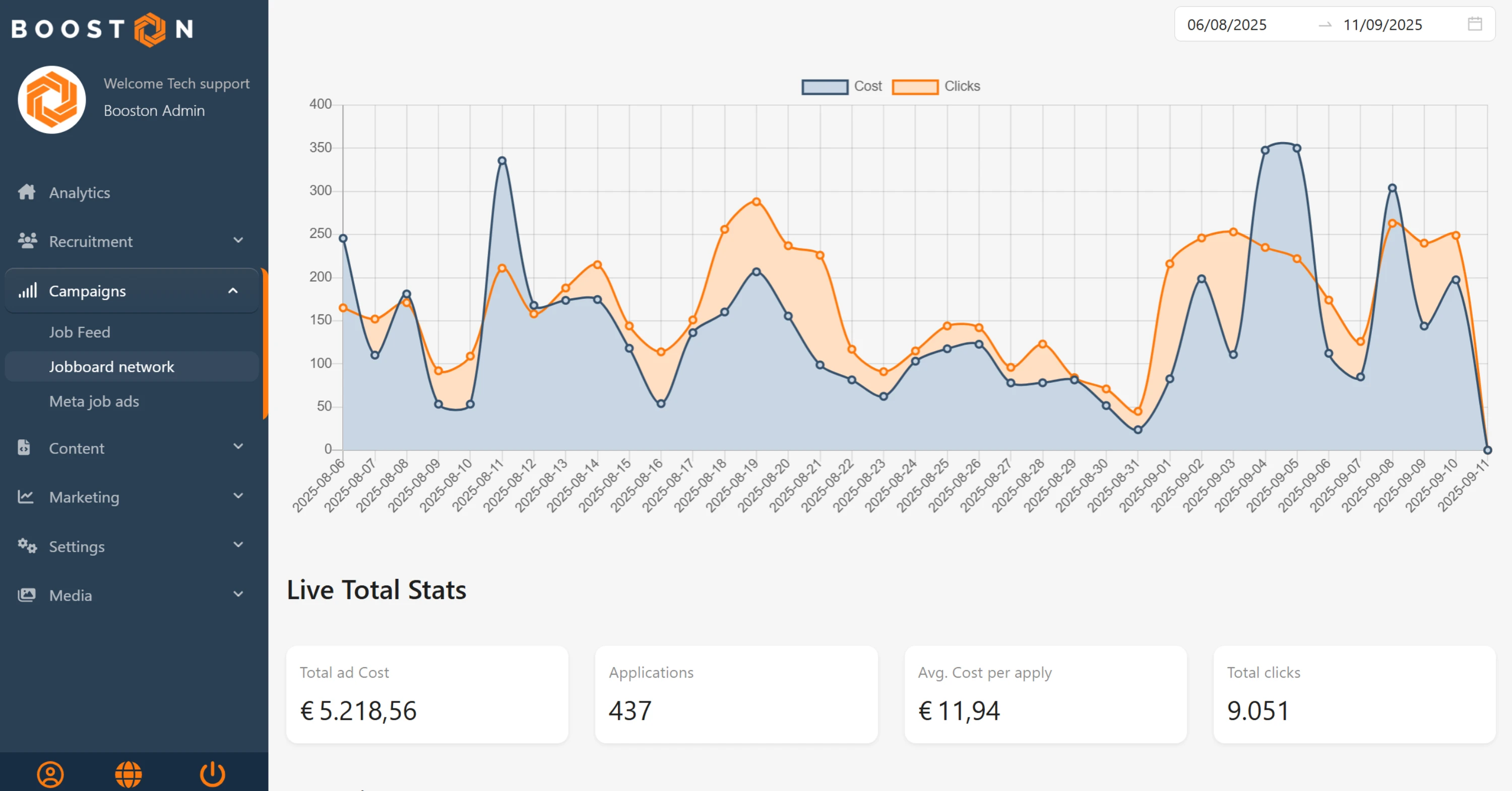
In Analytics you do not. Analytics measures at two moments: when a visitor lands on your site carrying a UTM code, and when that same visitor submits the application form there. A candidate who stays on Indeed does neither. There is no visit and no form, so no click and no application in your campaign reporting either. If Home or Campaigns shows fewer applications than the network does, this is almost always the explanation.
In Candidates they are not there at all. The application goes from Indeed to your ATS and never passes Booston. So no candidate is created, there is no CV to read out, there is no recruiter review, and Booston sends nothing to your ATS either: Indeed already did. Everything in Creating, editing and reviewing candidates therefore does not apply to these applications. You review them in your ATS, like applications that arrive there by another route.
| What you want to know | Where you look | Does Indeed Apply count |
|---|---|---|
| What an application costs | Jobboard network → Cost & Performance | Yes |
| Clicks and spend per job | Jobboard network → Cost & Performance, tab Jobs | Yes |
| Which channel brings you applicants | Analytics → Campaigns | No |
| The candidate themselves, with CV and review | Your ATS | Yes, in your ATS. Not in Booston |
The network reports two more figures about Indeed that we do not show yet: how many candidates started an application on Indeed, and what such a started application costs. As soon as those are in your dashboard, we will update this article.
What you cannot arrange yourself
The settings that apply to your whole account sit with Booston. You can see them, but you cannot change them.
- Job identifier under Settings: decides which job number goes out to the job boards, and so whether Indeed recognises your job.
- Status and Monthly campaign budget under Settings: decide whether your campaigns are live and what ceiling they have to stay under together.
- Publ. Status of a job board under Publishers: decides whether a job board can be picked in campaigns at all.
- The connection itself under Connect.
One wrong choice here hits all your running campaigns at once, and with the job number a wrong choice also costs you the history you built up. That is why a Booston admin does this behind the scenes, with the details that belong to it, and why someone always checks before it goes live.
Solving problems
My job on Indeed has no easy apply option, just a click through to the site
Indeed does not recognise the job in the campaign as the job it knows from your ATS. Usually the job number does not match: the Job identifier setting points at a different number from the one Indeed holds, or your ATS is not feeding the job to Indeed at all. Send us the job and the number you see in your ATS and we will compare it with what is in the feed.
The same job is published in two languages and Indeed picks the wrong one
If your ATS publishes a separate publication per language, the job number is the same for those two and the publication is not. Then ATS publication ID is the right choice. With ATS job ID both languages get the same number, and to Indeed that is one job.
My applications are in my ATS, but not in Booston
That is how this route works. The application was completed on Indeed and sent to your ATS by Indeed. See Where the results show up, and where they do not.
The cost per application shot up after it was switched over
After a change of job number the network starts building again: all your jobs are new, so the bidding and the performance history are gone. Give it two to three weeks and then compare with the period before the switch.
I see applications in Cost & Performance, but the rating column stays empty
Recruiter ratings only exist for candidates who end up in Booston. Applications completed on Indeed never pass through, so they carry no score. If you want to steer on quality, you do that in your ATS.
Frequently asked questions
Does Indeed Apply cost extra?
No. Indeed charges nothing for it. You pay what you always paid: the click you buy through the network.
Does my own application form stay in place?
Yes. Everything that does not come in through Indeed still runs through your own careers site and form. On Indeed too, jobs without recognition keep running through the click to your site.
Can I switch this on and off per job?
Not in Booston. The apply button belongs to the job on Indeed, so the place to arrange that is your ATS or your Indeed account. What you do decide in Booston is which jobs take part in which campaign.
We have no ATS at all. Can we still use this?
No. Without an ATS that feeds jobs to Indeed and takes applications back, there is nothing to connect to. Your jobs simply run on the network and the candidate applies on your own site.
Who is the data controller for that application?
The application is made at Indeed and delivered to your ATS by Indeed. That data never passes Booston. You make those arrangements with Indeed and with your ATS supplier.
What about the screener questions we normally ask?
You set those in Indeed's form, not in Booston. Indeed sends the answers along to your ATS. How many questions are allowed and how they arrive depends on your ATS integration: ask your supplier.
Need help?
Stuck, or not sure which job number belongs to your ATS? Email support@booston.io or call 085 0044 215 and mention:
- the name of your environment;
- the name or the URL of a job it concerns;
- the job number you see in your ATS, if you have it.
Would you rather look at it together and see whether this route suits your jobs? Book a free 30 minute online demo, and we will go through it with you. Job Done!


